A cabinet packing list connects each room and cabinet to the panels, doors and hardware shipped for it. The key is to give every physical package its own ID, then list what is inside by cabinet and part number. That way, the receiving team can tell whether a carton is still outstanding, a part is missing, or a delivered part is damaged.
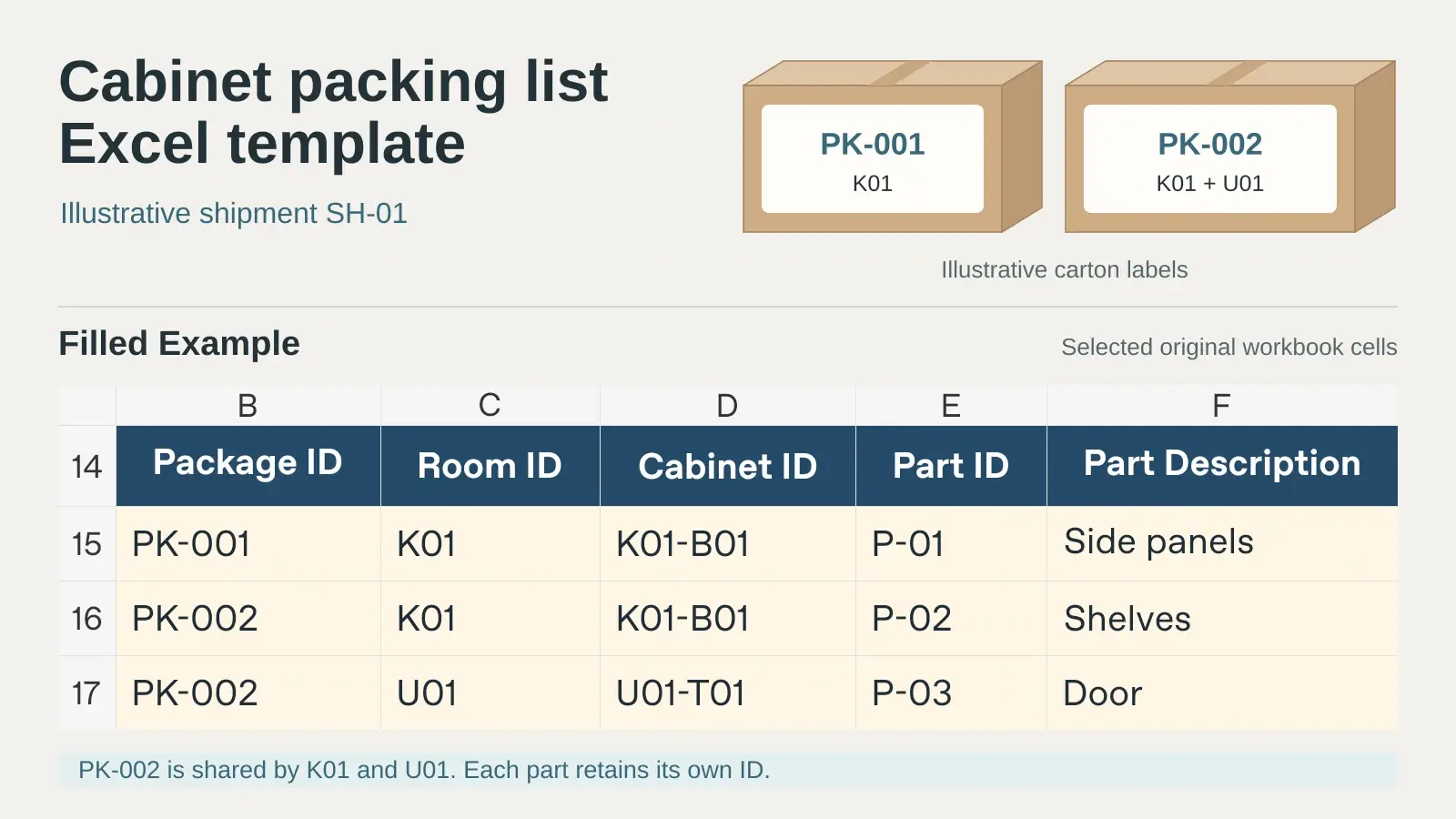
1. Download the Cabinet Packing List Template in Excel
Use this editable workbook for custom kitchens, wardrobes and other built-in cabinetry. It includes blank tables for your shipment and a filled example showing two cartons, one shared hardware box and a damaged shelf.
Download the cabinet packing list template (.xlsx)
| Excel tab | What to record |
|---|---|
| Package Register | One row per counted package. Record the shipment, package ID, destination mark, list revision, arrival date and external condition. Add actual package dimensions and gross weight if needed. |
| Contents and Receiving | One row per package, cabinet and part or kit allocation. Record the room, cabinet, part, box or bag, packed quantity, count, condition and follow-up. |
| Filled Example | Follow shipment SH-01 from its package labels through the first delivery and contents check. |
| Read Me | Review the field definitions, counting rules and instructions before entering your own shipment. |
Start from the approved room schedule, cabinet elevations and parts list. If you still need to organize cabinet dimensions, materials, hardware and approvals, use the wardrobe schedule template first. The schedule describes what was approved; the packing list records where the approved items were packed and what arrived.
2. Link Each Room, Cabinet and Part to a Package ID
2.1 Use cabinet references from the approved drawings
Copy the room code and cabinet ID from the current plan or elevation. For example, K01 identifies the kitchen and K01-B01 identifies a specific base cabinet in that room. P-01 identifies the side panels allocated to that unit. A cabinet type or finish may repeat across the project, so keep the unit ID even when two cabinets look identical.
List the drawing or schedule revision in your dispatch records and keep the approved reference with the issued packing list. Use short descriptions such as “left end panel,” “adjustable shelf” or “utility tall cabinet door” where they help the receiving team distinguish similar parts. See cabinet and wardrobe coordination for the drawings, samples and cabinet references that come before packing.
2.2 Give every carton, crate or hardware box a unique package ID
Use the same package ID on the physical label, package register and contents lines. Keep IDs unique within the workbook so each contents line points to one package. A cabinet can span several packages, and a package can contain parts for more than one cabinet. For a mixed carton, enter each room and cabinet on its own contents lines and mark the outside label “MIXED” with the room codes.
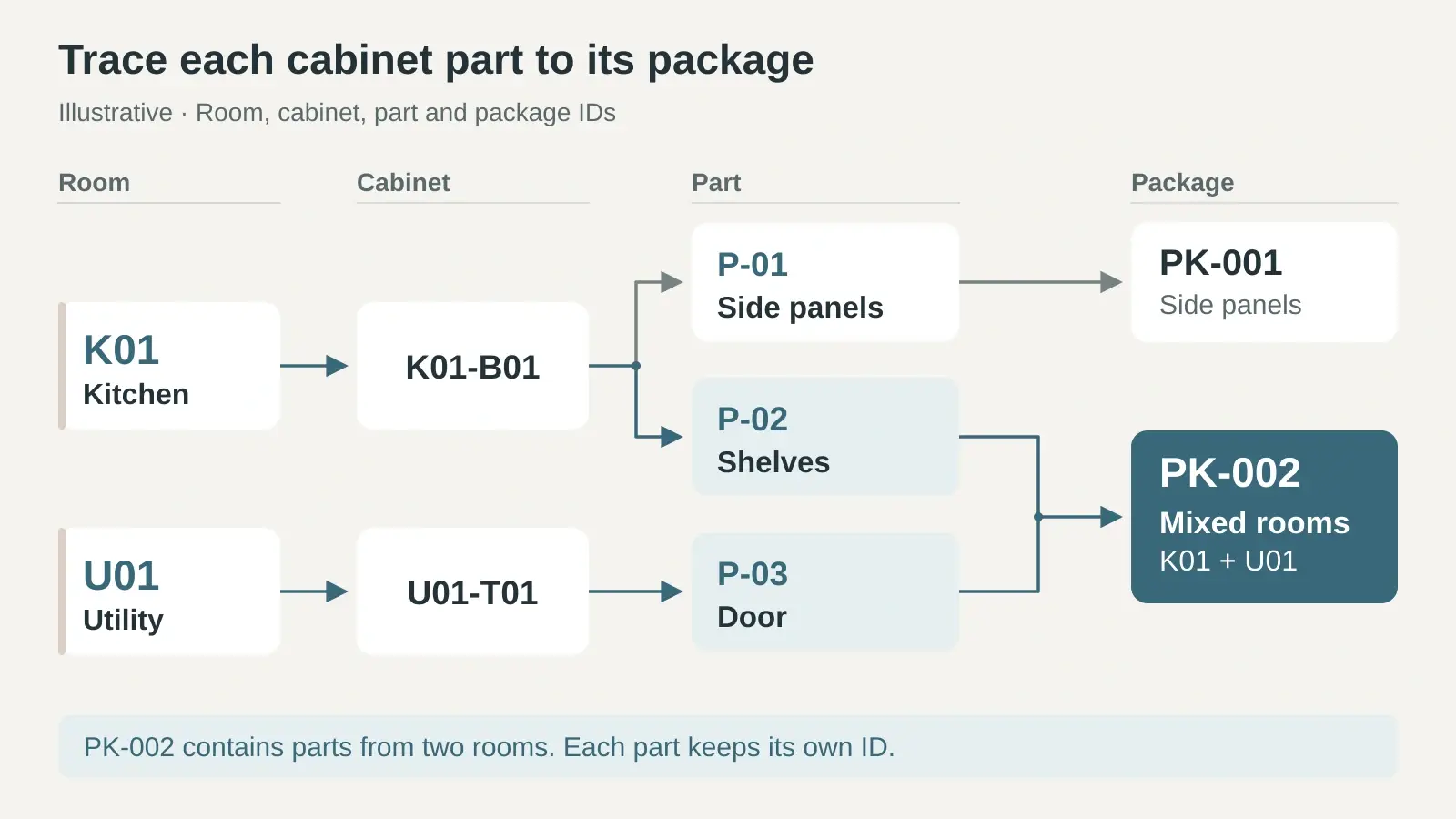
Agree which physical units the team will count at handover. If an outer pallet and its cartons both have references, keep the parent and child records linked and count only the agreed level in the delivery total. A carton count, a cabinet count and a count of individual parts answer different questions.
2.3 Record hardware boxes and inner bags separately
In the example, PK-003 is the physical package ID. HW-01 identifies the shared hardware box in the contents record, and B-01 and B-02 identify the inner bags allocated to individual cabinets. Put the cabinet ID and contents on each bag so it can be matched even after the outer carton is opened.
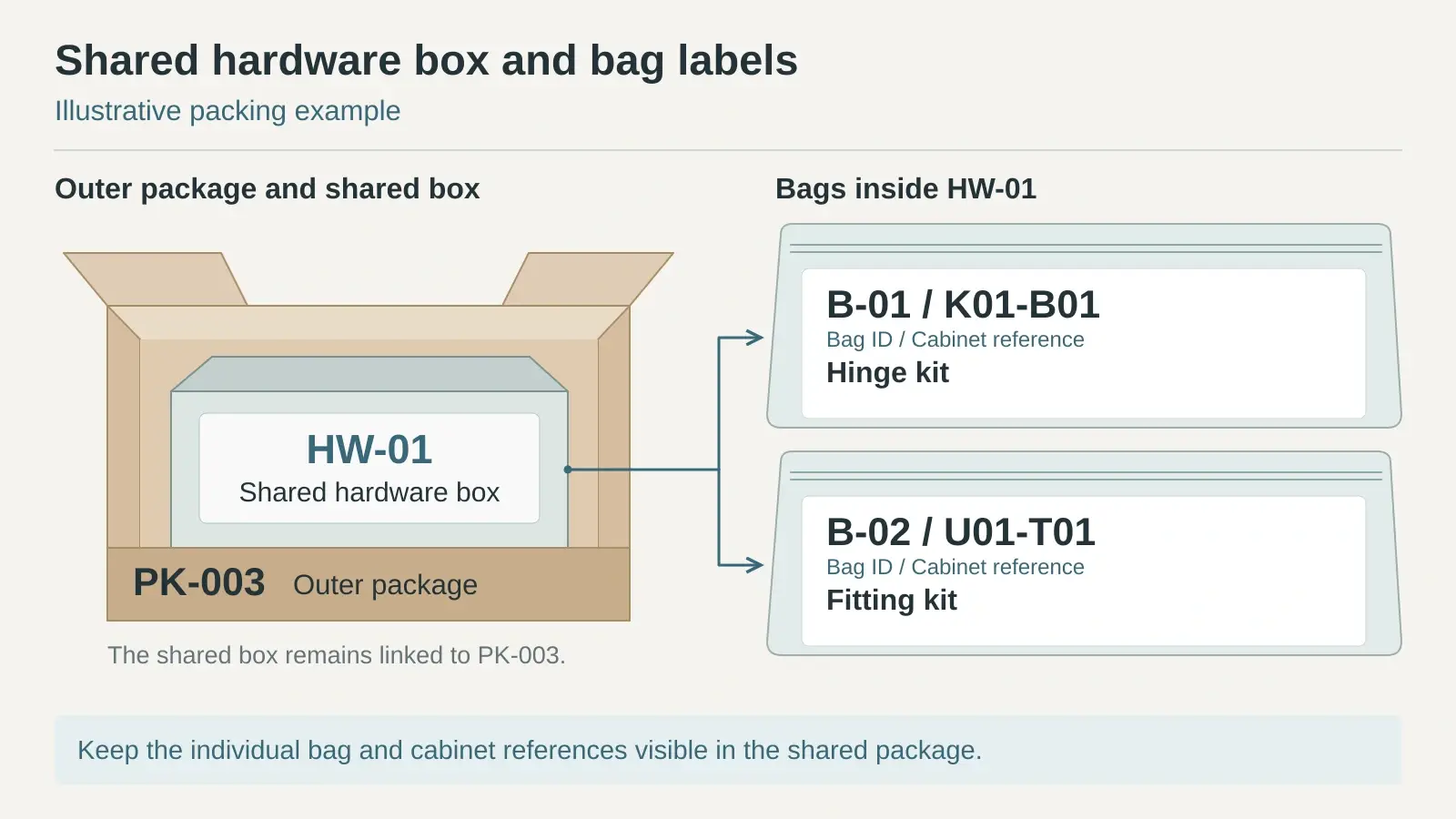
Specify the counting unit for every line: piece, pair, set or kit. If a line is counted as one hinge kit, attach or reference the agreed kit contents. Check the contents as required by the project before accepting the kit. Count either the complete kit or its separately listed components for that check; counting both inflates totals.
3. Label and Verify the Shipment Before Dispatch
3.1 Make the label easy to match at the receiving area
Keep the label short: shipment ID, package ID, destination or mixed-room mark and a brief description. For example: SH-01 / PK-002 / MIXED: K01 + U01 / shelves and door. Keep the full parts list in the workbook. Use a package sequence only as a secondary reference, since “2 of 3” alone does not identify a package across shipments.
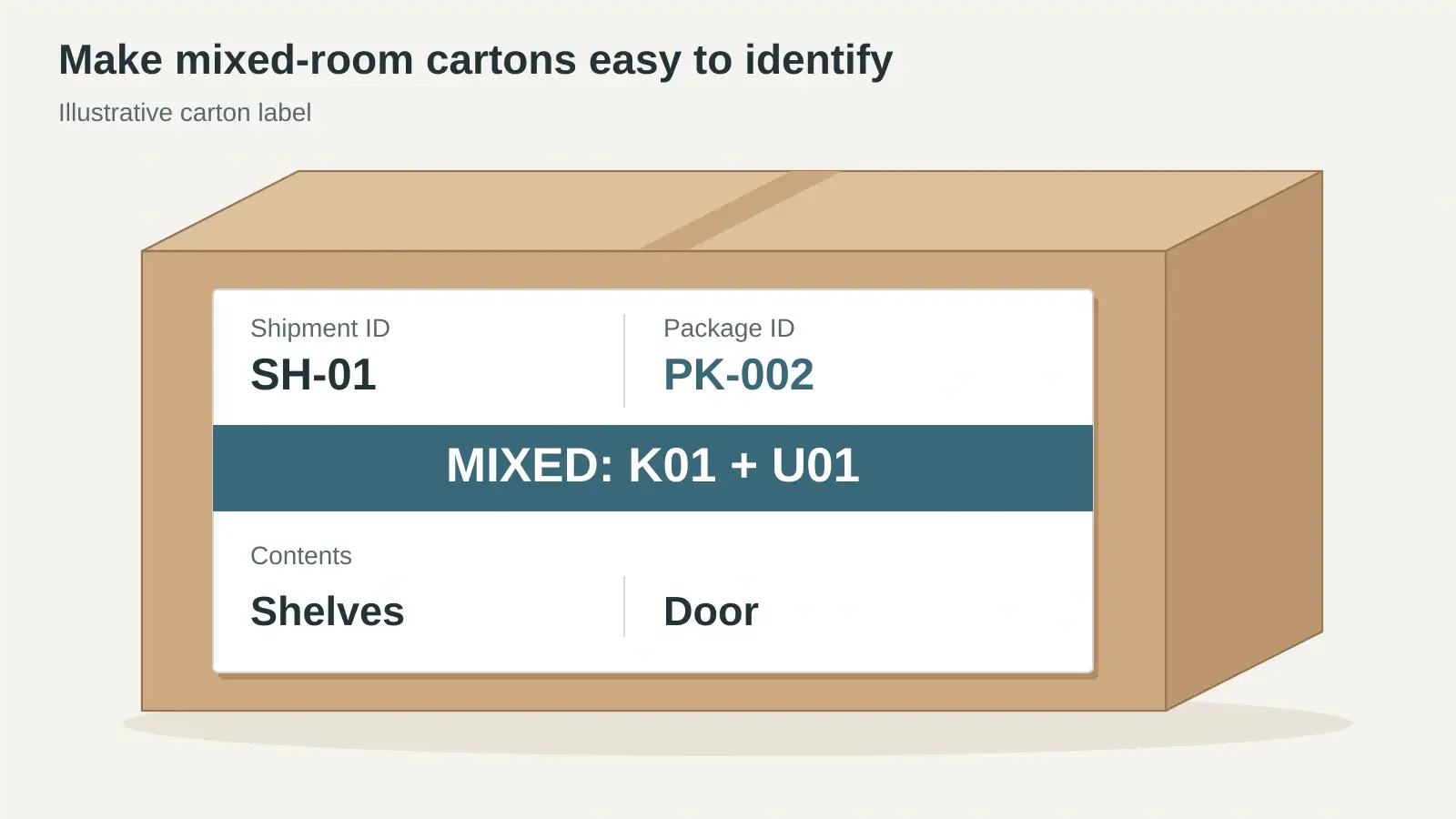
Add handling marks, protection notes and measured package dimensions or weights where required by your supplier, project or carrier. On orders that combine several product categories, agree packing and consolidation planning before dispatch so cabinet cartons, hardware and other materials can still be identified at site.
3.2 Verify the actual contents and issue the current revision
Check the package label against every contents line and compare quantities with the approved supply scope. Keep quantities for a later batch out of the dispatched list for the current shipment. If a part moves to another carton, update its contents line and affected labels before issuing the revised list. Keep the dispatch copy with the delivery reference and any package or pre-packing photos needed for follow-up.
4. Check Packages and Contents at Delivery
4.1 Check package arrival and outside condition first
Match the arriving package IDs to the issued list and note the delivery date, receipt reference and visible packaging condition. Record torn wrapping, a crushed corner or another visible issue against its package ID. If a listed carton is not at this delivery, mark it outstanding and follow up against the shipment reference. Leave its contents quantities blank while they remain uninspected.
4.2 Open each package and reconcile the actual count
Check the cabinet and part IDs, count the pieces or kits, and record the quantity accepted, damaged or on hold. For example, two shelves may be physically present even though only one can be accepted. The damaged shelf belongs in the counted quantity; it does not create a one-piece shortage.
Once an arrived package has been checked and the line count is complete, compare the counted quantity with the packed quantity. Use zero counted only when the check confirms that none of the line item is present. An unopened package or a partially checked line is still pending. Record any surplus, wrong item, damage or shortage against its package and contents line, with a photo or receipt reference, next action and owner. Follow the reporting process and timing agreed for the delivery. The FF&E receiving and partial delivery example shows a similar distinction for other project items.
5. Filled Cabinet Packing List Example
Shipment SH-01 has three package records. PK-001 arrived and its side panels were accepted. Mixed carton PK-002 arrived with both shelves and the utility door, but one shelf was damaged. The shared hardware box PK-003 is still outstanding at the first delivery.
| Package and allocation | Contents packed | First delivery check |
|---|---|---|
| PK-001 · K01 · K01-B01 | P-01 side panels, 2 pcs | Counted 2; accepted 2; missing 0. |
| PK-002 · K01 · K01-B01 | P-02 shelves, 2 pcs | Counted 2; accepted 1; damaged 1; missing 0. |
| PK-002 · U01 · U01-T01 | P-03 door, 1 pc | Counted 1; accepted 1; missing 0. |
| PK-003 · HW-01 · B-01 · K01-B01 | Hinge kit, 1 kit | Package outstanding; counts remain blank. |
| PK-003 · HW-01 · B-02 · U01-T01 | Fitting kit, 1 kit | Package outstanding; counts remain blank. |
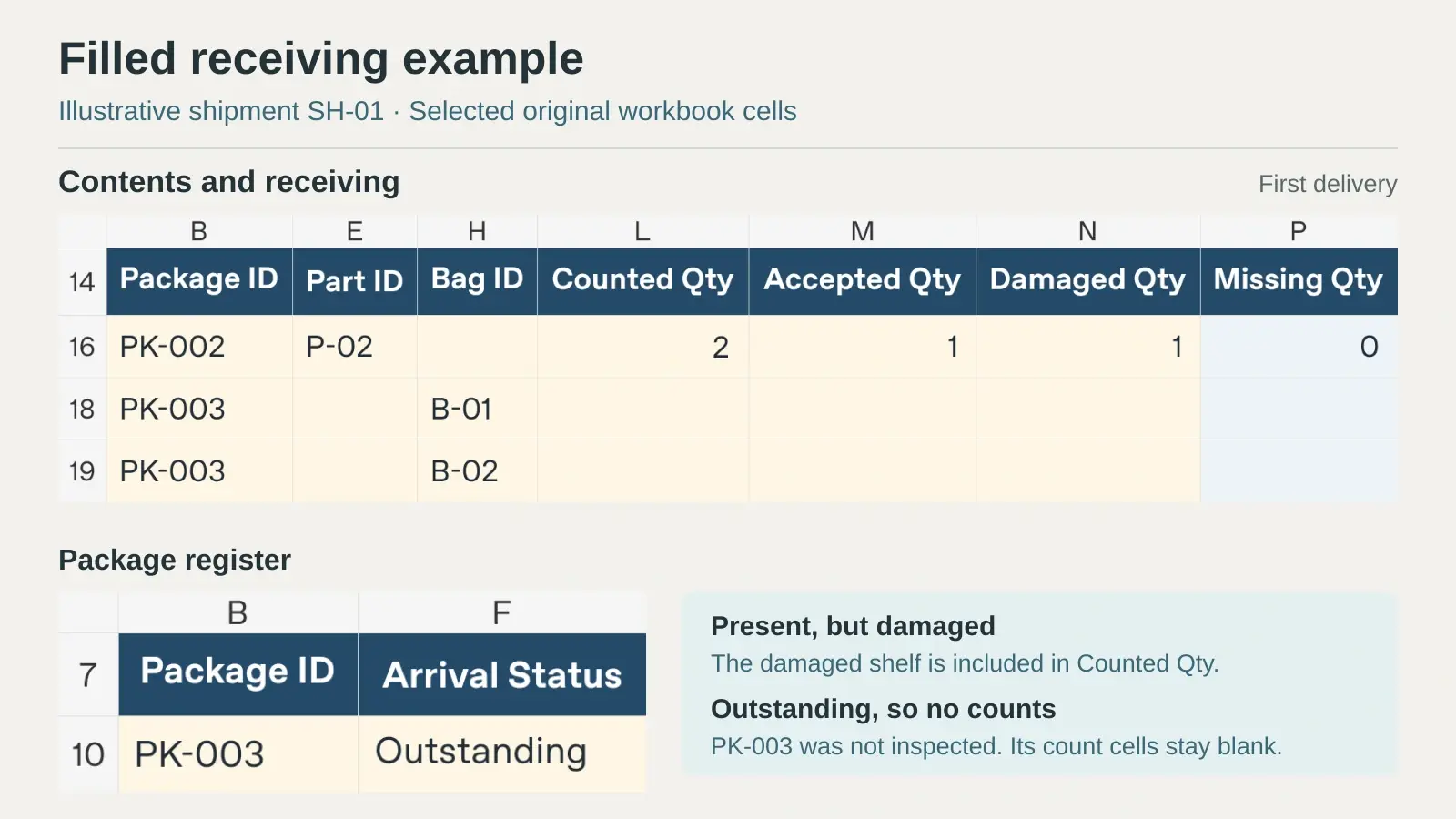
Two of three packages arrived. The team can identify which shelf needs follow-up and which hardware must still be checked. When PK-003 arrives, record its receipt and check both bags against their cabinet IDs before updating the two contents lines. Keep the earlier receipt and exception records with the project file.
6. Cabinet Packing List FAQs
6.1 What should a cabinet packing list include?
Include the shipment and revision, room, cabinet ID, part ID or description, package ID, quantities and units, plus the box or bag references for hardware. At site, add package arrival and condition, counted and accepted quantities, and an exception record for anything outstanding, damaged or missing.
6.2 Can one cabinet go in several boxes?
Yes. Give each box its own package ID and repeat the cabinet ID on the applicable contents lines. If the same part is split between two boxes, enter its actual quantity in each box on a separate line.
6.3 Is this the same as a commercial packing list?
This workbook is a project record for tracing cabinet parts and checking delivery. It can help prepare a commercial packing list, but an export or carrier document may require additional shipper, consignee, measurement or shipment details. Confirm the applicable documents with the responsible shipping team.
7. Coordinate Cabinet Packing Before You Order
If the order includes several rooms, separately packed panels or hardware shared across cabinets, agree on the IDs, label format and receiving responsibilities before packing starts. George House Material can discuss packing, consolidation and delivery coordination for the agreed supply scope. To review a project, send your cabinet schedule and packing requirements with the current drawings and delivery plan.